
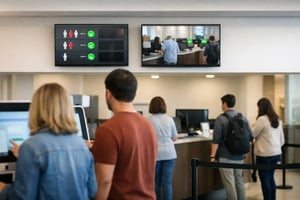
A customer who cannot tell where to go, how long the wait will be, or whether their request has been registered will judge the experience as slower than it is. That is the operational problem queue displays are designed to solve. In banks, clinics, retail service counters, QSR restaurants, and corporate reception areas, the screen is not simply a visual endpoint. It is part of the system that directs demand, communicates status, and gives teams a visible control point over physical flow.
The difference matters when a network operates across dozens or thousands of locations. A disconnected display may show a ticket number. A managed queue communication platform can apply routing rules, reflect live service status, support local exceptions, and maintain a traceable record of what was shown at each site. That is where queue management moves from a front-of-house device decision to an operational architecture decision.
Queue Displays Are an Operational System
A queue environment has three connected layers: the customer journey, the staff workflow, and the underlying data. If any one layer is inaccurate or delayed, the display can create more friction than it removes. Calling a customer to the wrong counter, showing an outdated estimated wait, or leaving a screen blank during a service interruption erodes trust quickly.
Effective queue displays provide immediate, unambiguous direction. They identify the next ticket or order, the service point, and the action expected from the customer. Depending on the environment, they can also show estimated wait times, preparation status, alternative channels, accessibility guidance, multilingual instructions, or relevant service content.
The primary measure is not screen uptime alone. Operations leaders need to understand whether the display logic supports throughput. A retail service desk may need to move customers toward the counter with capacity. A restaurant may need to separate order collection from delivery-status communication. A bank may need to route visitors by appointment type, language, or specialist availability. The same hardware can support each scenario, but the data model and rules cannot be identical.
This is why generic playlist software is often insufficient for business-critical queue communication. Queue content is conditional. It must respond to events, priorities, business hours, counter states, and local operating procedures without forcing local teams to manually rebuild screen layouts.
What a Reliable Queue Architecture Requires
The display is only as reliable as the architecture behind it. For a distributed organization, queue communication should be designed with governance, failover behavior, and supportability in mind from the start.
First, the platform needs a dependable connection to the source of truth. That may be a queue management system, point-of-sale platform, appointment engine, order management system, or a custom application. Integration can be delivered through APIs, databases, web services, or middleware, depending on the existing environment. The key requirement is clear ownership of each data field and an agreed response when the source is unavailable.
Second, content must be centrally governed while remaining adaptable at the location level. Brand teams may control approved layouts, typography, and messaging. Operations teams may own counter naming, service rules, and escalation messages. Local managers may require limited authority to activate an exception message during a disruption. Role-based access prevents these responsibilities from becoming uncontrolled changes across the network.
Third, the architecture needs device-level visibility. A screen that is powered on but not receiving live queue data is not operating correctly. Monitoring should distinguish between player connectivity, display status, application state, data freshness, and content publication. This provides the traceability needed for service teams to act before a local issue becomes a customer-facing failure.
Finally, continuity must be defined rather than assumed. If connectivity is interrupted, the system may need to retain the last valid queue state, display an approved contingency message, or switch to a local operating mode. The correct behavior depends on the criticality of the service. A brief delay may be acceptable for promotional content; it is not acceptable for a call screen directing customers to a secure service counter.
DEX Manager for Centralized Queue Communication
DEX Manager provides the central control layer for queue displays within a wider digital signage estate. It enables organizations to manage templates, schedules, screen groups, permissions, and device status from one platform, while integrating live data that changes the content shown on screen.
For queue use cases, the platform can map data from a queue or order system into predefined display zones. A call number may appear in a prominent area, while the assigned desk, directional cue, and service information populate adjacent zones. When the event changes, the screen updates according to the established layout rather than relying on a local operator to edit content manually.
This model supports standardization without making every location look or operate the same. A regional bank can use one governed design system while allowing branches to show different counter labels and local language content. A restaurant chain can maintain common order-status logic while adapting layouts for drive-through, pickup shelves, dining areas, and delivery collection points. The platform becomes a controlled publication environment rather than a collection of independent screens.
DEX Manager also supports the broader communications requirement around a queue. During low-demand periods, a display can show service guidance, product information, or corporate messaging. When queue activity reaches a defined threshold, operational content takes priority. This avoids dedicating expensive commercial display real estate to a single static function while preserving the hierarchy of critical information.
Deployment can be managed by SIA Interactive or through a certified partner network, with the same platform governance and operational standards applied across the estate. This matters for organizations that require local delivery capacity while maintaining central technology ownership and consistent controls.
Designing Queue Displays for Fast Decisions
Customers do not read queue screens like reports. They scan them while moving, often from a distance and in a noisy environment. The visual hierarchy must therefore answer the next action before it answers secondary questions.
The ticket, order number, or customer identifier should be the most visible element. The destination should be equally clear: counter number, collection point, room, or zone. Color can reinforce status, but it should not be the only indicator. Accessibility, viewing distance, ambient light, and language requirements all affect whether a design is usable in practice.
Audio alerts can improve response rates in certain settings, but they introduce trade-offs. They may be unsuitable in premium retail environments, clinical spaces, or locations with frequent calls that create noise fatigue. Visual alerts, directional indicators, and repeated calls may be more appropriate. The best approach depends on the customer profile, dwell time, and physical layout rather than a default feature set.
Content density requires similar discipline. Wait-time estimates can reduce uncertainty, but only when the calculation is sufficiently reliable. An estimate that regularly proves wrong can increase frustration. In some operations, a simple position-in-line indicator or a clear notification that service is delayed is more credible than an overly precise countdown.
Queue Use Cases Across Physical Networks
Queue displays take different forms across industries, but the operational objective remains consistent: reduce ambiguity at the point where demand meets capacity.
In quick-service restaurants, screens can distinguish between orders being prepared, ready for collection, and delayed. Integration with the order system reduces manual calls and helps staff focus on fulfillment. In supermarkets, queue displays can direct customers to available service counters or specialized desks, reducing crowding in front of a single point.
In financial services, the display may communicate ticket calls while protecting privacy through partial identifiers or non-personal numbering. Appointment and walk-in flows can be separated, enabling more predictable specialist allocation. In corporate environments, reception queue displays can direct visitors to hosts, meeting rooms, or security checkpoints while supporting emergency or business-continuity messaging when required.
Control rooms and high-security facilities bring another level of criticality. Here, a queue may involve access approvals, incident handling, or operational dispatch. The display layer must fit within defined permissions, audit requirements, and response procedures. The goal is not decorative communication. It is accurate, controlled information at the moment a person needs to act.
Measuring More Than Average Wait Time
Average wait time is useful, but it can hide the operational patterns that customers actually feel. A location may meet its average target while still producing long peaks at lunch, during shift changes, or after a system disruption. Queue display data should be evaluated alongside ticket volumes, service duration, abandonment, counter availability, and content or device exceptions.
This creates a more useful management conversation. If wait times rise, is demand increasing, are service points unavailable, is routing ineffective, or are customers failing to respond to calls? If abandonment is high, are estimates inaccurate, are instructions unclear, or are customers choosing another channel? A connected display system cannot solve every capacity issue, but it can make the issue visible and support a faster response.
The most effective queue displays make waiting feel organized because the underlying operation is organized. Start by defining the decisions customers must make, the systems that provide trusted real-time data, and the fallback behavior required when conditions change. The screen then becomes what it should be: a reliable operational interface between your service capacity and the people waiting to use it.